
Getting organized is one of the things that I am constantly working on improving. After years of using Microsoft Office on my Mac, I finally gave up and started using iCal, Mail and Contacts, all built in and native to the operating system. The integration with iPhone is seamless and all of my information synchronizes wirelesly using iCloud. This transition has been so helpful and really improved my organization. There is one after market tool that I started using about a year ago and really love. It’s called QuickCal. I originally found out about this on the PowerPage web site. The app is an excellent add-on to iCal because you can quickly add a new calendar event without having to leave your current screen. By pressing a 3 key code, a dialog window opens. You then simply type in your event in a descriptive sentence. Take a look at this sample graphic with the green button. Notice green box in the bottom right corner that illustrates "no conflicts". However, if I have an event that does conflict, the box turns red, so I can adjust accordingly. Looks like bowling is not going to work out... 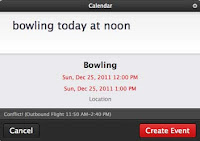
It was not until about a year later when I learned about another incredible feature of this software. The program update installed an icon on my OS menu. I was able to elect to have today’s date appear in the little box and when I click on the dropdown, I am able to see my calendar events for the next 72 hours. This is a nice feature, but even more critical is below that list. All of my reminders (which coincide with my iCal reminders and my SIRI reminders) are listed in the dropdown. I started assigning priorities to my reminder list and the top priority items are listed first. 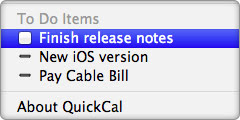
Throughout the day, things get so hectic that I have a grouping of 3-5 tasks that are thrown on my plate all at once. Now, I just simply create new reminders, prioritze them and then tackle them one at a time. When I’m done, the QuickCal dropdown list enables me to check off the item right from the dropdown. The interactivity with this list is borderline genius, so my hat goes off to the developers. Thank you for creating a dramatically beneficial organizational tool to my workflow.


